AI Horror Story Video Generator
Viral examples of this format right now
Real Shorts of this format getting views now. Watch them and clone any of them with your own script.
From a scary story to a narrated horror video
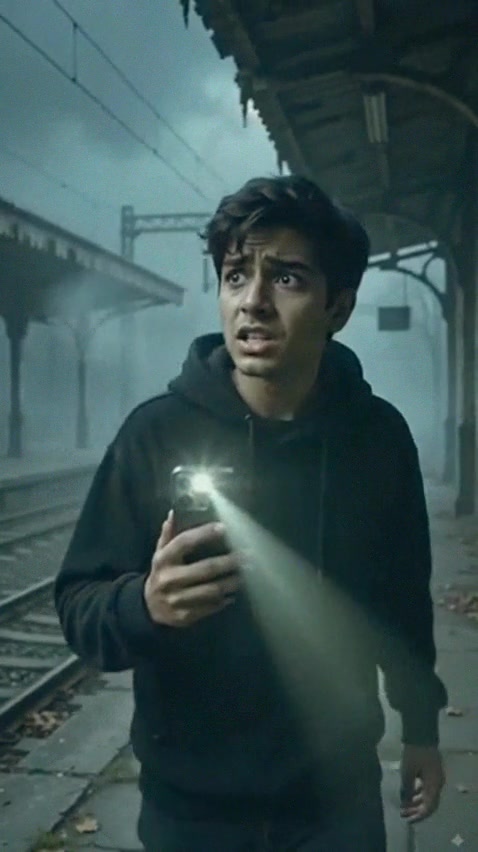
Paste your story or a one-line premise. The AI generates a dark cinematic scene for every line, records a calm, deep narration, adds eerie music and captions and cuts it to build dread until the final twist.
- Scenes, narration, music and captions in one go
- Dark cinematic look: fog, cold light, slow camera
- 30-60 second Shorts or longer YouTube stories
Creepypastas, true-crime style and urban legends
Ghost trains, haunted roads, rules you must never break, things that should not be in the photo: any scary story works. Use your own stories or write new ones, and keep the same narrator to give your channel a recognisable voice.
- Use your own story or start from a premise
- Choose the narrator voice and the soundtrack
- Edit or regenerate any scene before you export
How to Make an AI Horror Story Video in 3 Steps
Write or paste the story
Start with a normal situation, add one strange detail, build the dread and end with a twist in the last line. First person and short sentences work best for narration.
Keep it dark and slow
The tool starts with a dark cinematic look, a deep narrator and eerie music. Use 9:16 for Shorts and TikTok or switch to 16:9 for longer YouTube stories.
Generate and fine-tune
The AI generates every scene, the narration, the captions and the edit. Regenerate any scene that is not scary enough and export your video.
Frequently Asked Questions
What is an AI horror story generator?
Some tools only write the story as text. This one turns a story into a finished horror video: it generates a scene for each line with AI video, adds a narrator, music and captions, and edits everything together.
Can I use my own horror story?
Yes. Paste your own story, a creepypasta you have permission to use or a short premise, and the AI builds the video around it.
How long should a horror Short be?
Between 30 and 60 seconds, with a hook in the first line and the twist at the very end. For longer YouTube stories, switch to 16:9 and write several minutes of narration.
Can I make horror videos without a voiceover?
Most viral horror stories are narrated, but you can turn the voice off in the app and tell the story with on-screen text and sound only.
Can I monetize AI horror videos on YouTube?
Yes, if they are original. Write your own stories or use ones you have the rights to, avoid re-uploading other channels' videos, and label realistic AI content when YouTube asks for it.
Is it free?
You can try Vuela for free when you sign up. Generating AI video uses credits; the cost depends on the video length and the quality you choose.
Pricing
The best content. The cheapest price.
Lite
A light plan for casual creators getting started.
$9
per month
500
AI credits / monthly
- 80+ AI Creation tools
- AI Video with cloning & reimagining
- AI Images with Try-On & product shots
- Generate original background music
- Publish SEO-ready articles instantly
- Viral video inspiration
- 19+ preset & custom video styles
Starter
The essential toolkit for exploring AI content creation.
$19
per month
1,050
AI credits / monthly
- 80+ AI Creation tools
- AI Video with cloning & reimagining
- AI Images with Try-On & product shots
- Generate original background music
- Publish SEO-ready articles instantly
- Viral video inspiration
- 19+ preset & custom video styles
Growth
The perfect plan for serious content generation.
$59
$39
per month
2,200
AI credits / monthly
- 80+ AI Creation tools
- AI Video with cloning & reimagining
- AI Images with Try-On & product shots
- Generate original background music
- Publish SEO-ready articles instantly
- Viral video inspiration
- 19+ preset & custom video styles
Business
The complete solution for content-driven businesses.
$99
per month
6,000
AI credits / monthly
- 80+ AI Creation tools
- AI Video with cloning & reimagining
- AI Images with Try-On & product shots
- Generate original background music
- Publish SEO-ready articles instantly
- Viral video inspiration
- 19+ preset & custom video styles
- Priority support
Looking for a custom plan?
Adapted to your business needs (volume and customization)
Explore more AI video tools
Faceless AI Video Generator Tool
Create engaging faceless AI videos perfect for storytelling, explainer videos, and educational content.
AI Image to Video Generator
Convert images to engaging videos using our advanced AI technology.
AI Video Cloner Tool
Analyze any video and create an AI-powered replica with new visuals, voices and music while keeping the same narrative structure.
Trump AI Video Generator Tool
Create AI-generated videos inspired by political speeches, debates, and viral moments. Perfect for satire, commentary, and social content.
Video to Video AI Generator
Transform any YouTube, TikTok or Instagram video into a brand-new AI-generated version. Extract the script and recreate it with your own style.
AI Video Director Tool
Chat with an AI director that plans your entire video production — scenes, camera movements, dialogues, music and sound effects.
AI Motion Transfer: Copy Dance Moves to Any Character
Transfer poses and movement from one video to another. Make any character dance, gesture, or move exactly like your reference clip.
Billie Eilish AI Video Generator Tool
Create AI-generated videos in the moody pop visual style. Perfect for music edits, lyric storytelling and aesthetic fan content.
AI Video Editor Online: Edit, Cut and Generate Video with AI
The AI video editor that writes captions, trims silences, adds music and generates B-roll for you. Edit any video online in minutes, not hours.